Benefits

Companies Hiring

Salary Package

₹3 LPA – ₹6LPA

(Depending on Experience & Location)

Benefits

Companies Hiring

Salary Package

₹6 LPA – ₹12 LPA

(Depending on Experience & Location)

Benefits

Companies Hiring

Salary Package

₹6 LPA – ₹12 LPA

(Depending on Experience & Location)

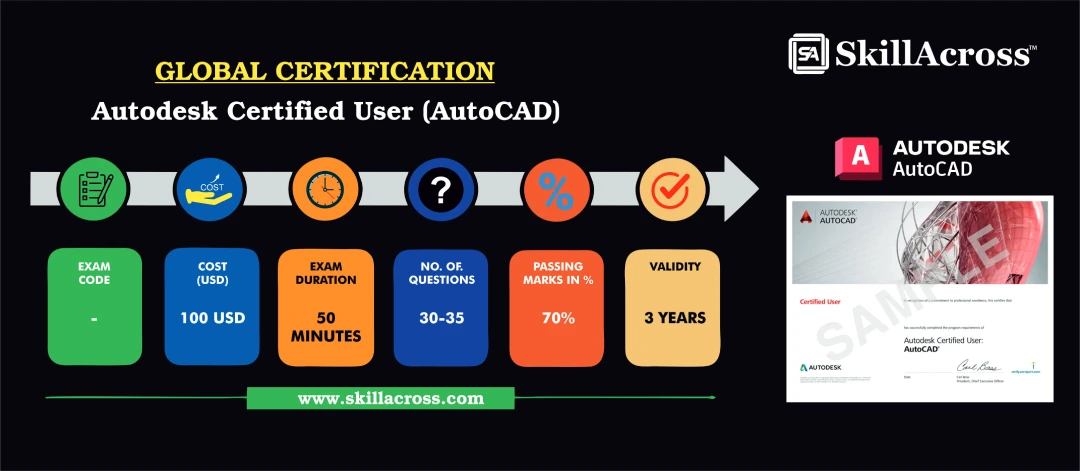
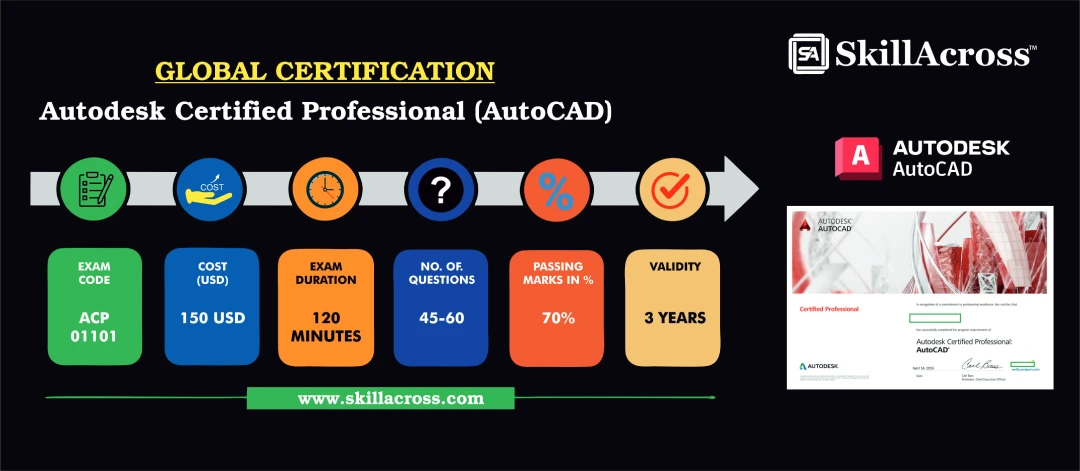
Global Certifcation

Autodesk Certified User - AutoCAD

Autodesk Certified Professional - AutoCAD

Course Contents (Syllabus)

Introduction to BIM & Civil Drafting

Overview of Building Information Modeling (BIM) in civil engineering. Importance of BIM in modern construction and infrastructure projects. Basic drafting concepts, CAD standards, and documentation practices.

Labs & Practical Exercises

AutoCAD

The AutoCAD Lab & Practical Exercises are designed to give students hands-on experience in drafting and design. Through step-by-step practice, learners will work on real-time civil engineering drawings such as floor plans, elevations, sections, structural details, and site layouts. The lab sessions focus on applying commands, dimensioning, layer management, and plotting techniques to create professional drawings. By completing these practical exercises, students gain confidence in using AutoCAD for industry-based projects, ensuring they are job-ready with both theoretical knowledge and practical skills.

Skills You Will Learn

Frequently Asked Questions

  • What software will I learn in this course?
    Primary Tools: Revit, AutoCAD Civil 3D, Navisworks, ArchiCAD Optional Tools: SketchUp, Microsoft Project, BIM 360 for collaboration.
  • Will I receive a certificate?
    Yes, a globally recognized Certified Drafting Professional with BIM Tool (Civil) certificate will be awarded upon completion.
  • Are there any prerequisites?
    Basic knowledge of CAD or civil engineering concepts is recommended but not mandatory.

Your Career Starts Here

Enquiry Form

×
Internship Program Enquiry
Internship Form (#5)